Bike computers with Komoot make route planning and on-bike navigation far easier, whether you ride roads, gravel, or long-distance endurance routes. The right model should pair reliable GPS performance with clear turn-by-turn guidance and controls that work while riding.
In this roundup, we focus on 10 standout options that balance navigation quality, battery life, display clarity, and smart features for different types of cyclists.
Best 10 Bike Computers with Komoot Picks for 2026
Smart Route Sync

- Imports routes from Komoot, Strava, GPX, and TCX
- Turn-by-turn prompts with LEDs and audible cues
- 20-hour battery plus radar and smart notifications
Best For: Riders who want compact navigation with automatic Komoot syncing
Premium Navigation Hub

- 3.5-inch touchscreen with speaker and Garmin Pay
- Create courses on-device and view road surface details
- Up to 60 hours battery saver mode with ride awareness features
Best For: Cyclists who want a premium touchscreen with advanced navigation
Trail-Ready Mapping

- 3.2-inch touchscreen with multi-band GNSS
- Fast map rendering and ample storage for routes
- Works with SRAM AXS, e-bikes, and ANT+ lights
Best For: Riders who want precise touchscreen navigation and clean mapping
Compact Training Guide

- Up to 26 hours battery life, 42 in saver mode
- Button controls with multi-band GNSS and detailed maps
- Adaptive coaching plus stamina and power guide features
Best For: Cyclists who want compact navigation and training support
Flagship Touchscreen Navigator
iGPSPORT BSC500 3.3'' Touchscreen Bike Computer

- Imports Komoot routes and other third-party files
- 3.3-inch touchscreen with button backup
- Voice navigation and automatic rerouting
Best For: Riders who want guided navigation and a large display
Premium Long-Ride Pick
Garmin Edge 1040 GPS Bike Computer

- Connects with Komoot and other major platforms
- Multi-band GNSS for improved positioning
- Up to 35 hours battery, 70 in saver mode
Best For: Long-distance riders who want premium navigation and training tools
Compact Value Navigator
iGPSPORT BSC200S 2.4'' Route Bike Computer

- Imports Komoot routes and supports one-touch navigation
- Compact 2.4-inch color display
- 25-hour battery and turn/yaw reminders
Best For: Riders who want a compact, practical Komoot-compatible computer
Solar Navigation Flagship
- Solar lens helps extend battery life on daytime rides.
- Multi-band GNSS improves positioning accuracy.
- Works with Komoot, Strava, and TrainingPeaks.
Best For: Endurance riders who want premium navigation and long battery life
Touchscreen Climbing Navigator

- Voice-guided map navigation in 13 languages.
- Dual-band GNSS for precise positioning.
- Wi-Fi and Bluetooth support fast syncing and route planning.
Best For: Riders who want a large touchscreen and climb-focused navigation
Compact Route Planner
- Compact touchscreen with offline route navigation.
- Multi-scenario ClimbPro shows real-time climb data.
- Highly customizable with 110+ data fields.
Best For: Cyclists who want a smaller, flexible GPS computer for routes and climbs
Smart Route Sync – Wahoo ELEMNT Bolt V3
If you want bike computers with komoot support that keep routing simple, the Wahoo ELEMNT Bolt V3 is built around automatic route downloads and on-device turn-by-turn guidance. It imports routes from Komoot, Strava, Ride with GPS, GPX, and TCX files, then uses LEDs and audible cues to help you stay on course without constant screen checking.
Best For: Riders who want automatic Komoot syncing, straightforward navigation, and a compact computer with reliable ride alerts.
Pros:
- Automatically downloads saved routes from Komoot and other connected accounts
- On-device turn-by-turn navigation with top LEDs and audible cues
- On-demand route generation from the unit or companion app
- Includes smart notifications, LiveTrack, and ANT+ radar integration
Cons:
- Smaller 2.3-inch LCD screen than premium touchscreen units
- Battery life is rated at 20 hours, which is solid but not class-leading
- Button-based control may feel less flexible for detailed map interaction
For riders focused on dependable navigation and seamless Komoot syncing, the Bolt V3 covers the essentials well. It trades a larger display and touch controls for a lighter, more compact setup that still feels feature-rich on the road.
Premium Navigation Hub – Garmin Edge 1050
Among bike computers with komoot, the Garmin Edge 1050 stands out as a premium touchscreen option for riders who want navigation and ride data in one large display. It focuses on route planning, cycling awareness, and connected features, with a vivid 3.5-inch screen, onboard speaker, and support for creating courses directly on the device.
Best For: Cyclists who want a high-end touchscreen computer for navigation, planning, and connected ride features.
Pros:
- Large 3.5-inch vivid color touchscreen for easier map viewing
- Supports course creation on the device and detailed navigation prompts
- Up to 60 hours of battery life in battery saver mode
- Built-in speaker, Garmin Pay, group ride messaging, and hazard alerts
Cons:
- Heavier and larger than compact bike computers
- Premium feature set likely makes it overkill for casual riders
- Most advanced connected functions depend on a compatible smartphone
If you want the most full-featured ride experience in this group, the Edge 1050 is the most expansive option. It is designed for riders who value a large screen, deep navigation tools, and plenty of connected extras more than minimal size.
Trail-Ready Mapping – Hammerhead Karoo
If you are comparing bike computers with komoot, the Hammerhead Karoo is a strong pick for riders who care about map clarity and accurate navigation. It uses a 3.2-inch touchscreen, multi-band GNSS, and a design focused on fast map rendering and low-distraction ride data handling.
Best For: Riders who want a touchscreen bike computer with precise tracking and clean map handling for varied routes.
Pros:
- Multi-band GNSS for more accurate tracking in varied environments
- Touchscreen interface designed for easier map and ride data management
- Extended battery life and ample storage for faster map rendering
- Works with SRAM AXS products, e-bikes, ANT+ lights, and more
Cons:
- Battery life is rated at 15 hours, shorter than some competitors
- USB connectivity is listed, with fewer connectivity details than others
- Less focused on broad smart connectivity than some rival units
The Karoo is best when navigation accuracy and map performance matter more than maximum battery life. It feels purpose-built for riders who want a modern touchscreen experience with robust positioning and ecosystem support.
Compact Training Guide – Garmin Edge 540
For riders searching for bike computers with komoot-compatible workflow and a more compact format, the Garmin Edge 540 focuses on navigation, adaptive coaching, and ride planning. Its button controls, multi-band GNSS, and ride type-specific maps make it a practical choice for cyclists who want strong training tools without a touchscreen.
Best For: Cyclists who want a compact button-controlled computer with navigation and training guidance.
Pros:
- Up to 26 hours of battery life, or 42 hours in battery saver mode
- Multi-band GNSS for improved positioning accuracy
- Adaptive coaching, stamina insights, and power guide features
- Improved maps highlight popular roads, trails, and searchable points of interest
Cons:
- No touchscreen, so map interaction is less direct
- 16 GB storage is modest compared with premium models
- Advanced training features depend on compatible power meter and heart rate monitor
The Edge 540 is a balanced choice if you want a smaller computer that still offers serious navigation and training support. It is especially appealing for riders who prefer button controls and longer battery life over a larger display.
Flagship Touchscreen Navigator – iGPSPORT BSC500 3.3'' Touchscreen Bike Computer
If you want bike computers with komoot support and a larger, easier-to-read interface, the iGPSPORT BSC500 is built around navigation first. It imports routes from Komoot and other third-party apps, adds voice guidance, and uses dual-band, multi-satellite positioning to improve route accuracy on the road or trail.
Best For: Riders who want a touchscreen bike computer with Komoot route import, voice prompts, and strong navigation tools.
Pros:
- 3.3-inch touchscreen plus button control for flexible operation
- Imports routes from Komoot, Strava, and other apps via iGPSPORT
- Voice navigation, turn reminders, and off-course rerouting
- Dual-band positioning and support for multiple satellite systems
Cons:
- Larger screen may be more than some riders need for simple ride tracking
- Navigation and training features may feel more advanced than entry-level units
- Touchscreen focus can be less minimal than a basic button-only computer
The BSC500 stands out if you want a more guided ride experience with clear map navigation and smart route handling. It blends Komoot compatibility with practical extras like climb planning and voice alerts, making it a strong pick for riders who navigate often.
Premium Long-Ride Pick – Garmin Edge 1040 GPS Bike Computer
The Garmin Edge 1040 is a strong choice in bike computers with komoot support if you want top-tier navigation, training, and battery life. It connects with Komoot through Garmin’s ecosystem, adds multi-band GNSS for improved positioning, and gives you ride-type maps, planning tools, and long-lasting power for demanding days out.
Best For: Riders who want a premium GPS bike computer with Komoot connectivity, advanced navigation, and very long battery life.
Pros:
- Works with Komoot and other major platforms through Garmin Connect
- Multi-band GNSS for enhanced positioning accuracy
- Up to 35 hours of battery life, or up to 70 hours in battery saver mode
- Includes ride-type maps, training tools, and smart connectivity
Cons:
- Premium feature set may be more than casual riders need
- Requires Garmin Connect smart-device app for app/platform connections
- Higher-end package can be overkill if you only want basic route following
For riders who care about navigation confidence and deeper performance data, the Edge 1040 is one of the most capable options here. It combines Komoot compatibility with serious battery endurance and a wide feature set for training and route planning.
Compact Value Navigator – iGPSPORT BSC200S 2.4'' Route Bike Computer
If you’re comparing bike computers with komoot support and want something compact, the iGPSPORT BSC200S covers the basics well. It can import Komoot routes, offers one-touch navigation from the app, and adds turn reminders plus route guidance in a smaller, easier-to-mount package.
Best For: Riders who want a smaller GPS bike computer with Komoot route import and straightforward navigation features.
Pros:
- Imports routes from Komoot, Strava, and Ride with GPS
- One-touch navigation for quick route sending from the app
- Turn reminders, yaw guidance, and back-to-start navigation
- Compact 2.4-inch display with 25-hour battery life
Cons:
- Smaller screen is less immersive than larger bike computers
- Button-only input may feel less modern than touchscreen models
- Type-C cable is not included in the box
The BSC200S is a practical pick if you want Komoot route support without paying for a larger, more advanced unit. It balances route navigation, useful alerts, and long battery life in a compact design that should fit most everyday riding needs.
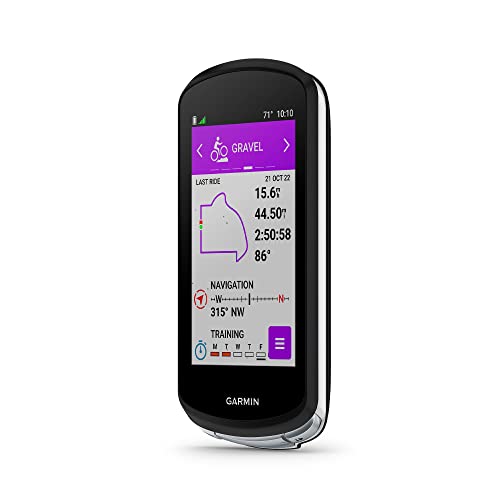
Solar Navigation Flagship – Garmin Edge 1040 Solar
If you want bike computers with komoot support for long rides and serious navigation, the Garmin Edge 1040 Solar is built for riders who value battery life, route guidance, and training data in one unit. Its solar lens, multi-band GNSS, and improved ride type-specific maps make it a strong pick for difficult routes and all-day riding.
Best For: Endurance riders and route-focused cyclists who want solar-assisted battery life, advanced navigation, and broad app compatibility.
Pros:
- Power Glass solar charging can extend battery life, especially on daytime rides.
- Multi-band GNSS improves positioning accuracy in challenging environments.
- Connects with apps and platforms including Strava, Komoot, and TrainingPeaks.
- Ride type-specific maps highlight popular roads, trails, and searchable points of interest.
Cons:
- Premium feature set may be more than casual riders need.
- Best advanced training features depend on compatible sensors.
This is the most capable option in the group if you want a polished navigation experience plus deep training support. The combination of solar charging, detailed maps, and Komoot compatibility makes it a practical choice for ambitious cyclists.
Touchscreen Climbing Navigator – Magene C706
For riders comparing bike computers with komoot support, the Magene C706 stands out for its map navigation, voice guidance, and climb-focused tools. It combines a large color touchscreen with dual-band GNSS, so you can follow routes and stay aware of climbs without constantly checking the screen.
Best For: Riders who want a touchscreen GPS computer with voice-guided navigation, climb tools, and strong connectivity.
Pros:
- Map navigation with voice guidance in 13 languages helps reduce head-down riding.
- Dual-band GNSS is designed for precise positioning in forests and cities.
- Freeride ClimbPro supports climb planning by category and nearby climb access.
- Wi-Fi, Bluetooth, and ANT support fast syncing and offline route planning.
Cons:
- Battery life is rated at 25 hours, below the longest-lasting options here.
- Some advanced features rely on compatible sensors or connected devices.
The C706 is a compelling pick if navigation clarity matters more than raw battery endurance. Its voice prompts, climb tools, and large touchscreen make it easy to use on unfamiliar roads and hilly routes.
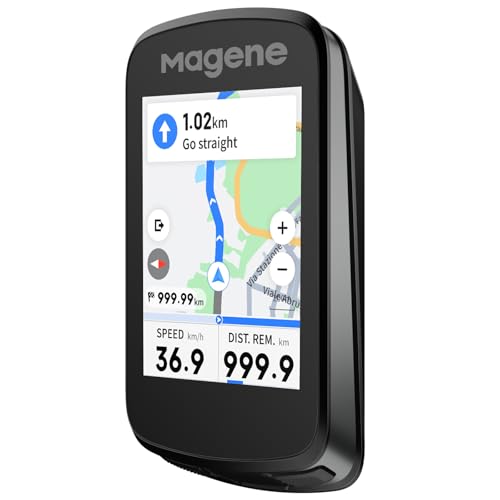
Compact Route Planner – Magene C606 V2
If you want bike computers with komoot support in a smaller, streamlined package, the Magene C606 V2 offers offline navigation, climb tools, and a customizable interface. It is built for riders who want useful route guidance, training features, and wireless convenience without moving to a larger head unit.
Best For: Cyclists who want a compact color touchscreen with route navigation, climb tracking, and strong customization.
Pros:
- Wireless offline navigation supports GPX import, ride history, app destinations, and routes up to 1,000 km.
- Multi-scenario ClimbPro gives real-time gradient, distance, and elevation details.
- Highly customizable layouts with 12 riding modes and 110+ data fields.
- Fast Wi-Fi and Bluetooth syncing plus automatic AGNSS updates.
Cons:
- Smaller 2.8-inch display offers less screen space than the C706.
- Battery life tops out at 25 hours, which may not suit the longest tours.
The C606 V2 is a smart choice if you want navigation and climb tracking in a more compact format. It balances route tools, indoor training support, and customization well for everyday riders.
How We Picked These Bike Computers with Komoot
We looked for models that make Komoot routing practical in real-world riding, with a focus on accurate GPS tracking, readable screens, dependable battery life, and easy route syncing. We also favored computers that offer strong app support, useful training data, and weather-resistant builds.
Quick Comparison
If you want the simplest summary, think of these options in three groups: premium full-featured units for riders who want the biggest screens and best navigation tools, compact performance models for riders who value speed and efficiency, and budget-friendly computers that still handle route guidance well.
Key Buying Factors for Bike Computers with Komoot
Navigation and Map Handling
Choose a device that can display Komoot routes clearly, recalculate when needed, and keep directions easy to follow at a glance. Full-color mapping helps on unfamiliar roads, while breadcrumb-style routing can be enough for simpler rides.
Screen Size and Visibility
A larger touchscreen is easier to read and tap, but compact button-controlled units can be better in rain, gloves, or rough terrain. Consider brightness, contrast, and whether you often ride in direct sun.
Battery Life
Battery matters most on all-day rides, bikepacking trips, and winter training. If you regularly ride long distances, look closely at real-world battery claims rather than just the headline number.
Smart Features and Connectivity
Beyond Komoot, check for ANT+, Bluetooth, power meter support, live segments, climb data, and sensor compatibility. These features can matter more than extra screen flair if you train seriously.
Who Should Buy Which Bike Computers with Komoot?
Choose a premium model if you want the best navigation experience, large maps, and advanced training tools. Pick a midrange computer if you want a strong balance of performance and price. Go for a simpler budget option if you mainly need dependable route guidance for commuting, weekend rides, or occasional touring.
For most riders, the best choice is the bike computer that matches how you actually ride: easy visibility for city commuting, tougher battery life for long adventures, or richer data and mapping for training-focused cyclists.